Day 4 - Comparing image-to-3d models
A couple people have gotten me interested in 3d printing lately. Something I wanted to explore was printing little statuettes or busts of people. I don't have any background or experience in using computer graphics apps like Blender, so I wanted to find or build a pipeline that was a) ideally entirely software based and b) removed as many intermediate steps as possible. Something like a system that just takes in a regular image of someone and then outputs a printable 3d model.
After doing some research on the best image-to-3d-model models, I settled on Hunyuan 3d-3.0 and Hitem-1.5.
To compare the output quality of both models, I used as a reference image a bust of Anson Burlingame (the namesake of the city of Burlingame) that I took when I recently visited the Burlingame library to see their 3d printing lab. They have a "Labs" program where twice a week they'll have dedicated staff give you hands on training on how to 3d print. Go check it out if you're from the area!
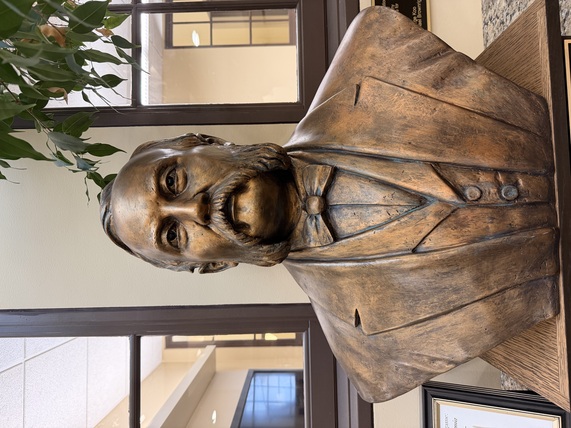
The reference image
The resulting 3d models are below. Try dragging/manipulating them with your mouse or touch.
Hitem 3d 1.5
Hunyuan 3d-3.0
It's amazing this was all done off of a single image, but it isn't 100% of the way there in terms of accuracy. They get the broad strokes of the facial features down, but they're both still off in subtle ways. Still crazy that this was all done on a single reference image, though. They do support uploading multiple source images taken from different angles, although I'm not sure that'd boost the accuracy of the facial features to the reference.
The best way to achieve a perfect likeness is to do a 3d scan, which I also tried out and you can see the result of below.
3d scan using my iPhone 17 pro
I don't think many people realize just how accessible producing a great looking 3d scan has become with modern phones. The issue though, is that if the object is up aginst the wall like this bust was, then it'll be hard to get good coverage of the back. Then your model will have gaps and tears in it, making it unprintable. This is what ended up happening to my scan. It looks amazing, but if I want to print this, I need to look into ways to reconstruct the missing patches in the model. Otherwise, I really might just need to pick up Blender...